Table of Contents
Rails not only uses what is called the Model-View-Controller pattern, this pattern was pretty much invented with Rails.
Collections and Members
The primary purpose of most applications is to allow users to see and modify data. When it comes to routing in Rails, a Collection is a group of data of a common type, such as blog posts, temperature measurements, flight paths, recipes or whatever it is that your application is dealing with. A Member is a single element of the Collection and is normally identified by a unique numeric ID. The element itself will have numerous characteristics, which may be Members or Collections of other information types.
For example, if I have a recipe it will certainly have a name, many different classifications (Vegan, Glucose Free, Spicy, Calorie Count, Preparation Time, etc..) as well as collections of ingredients and steps used to prepare the food. Each recipe would be a Member in a Collection of recipes, however the ingredients and steps in preparing the recipe would also be Collections that belong to the recipe.
Routes
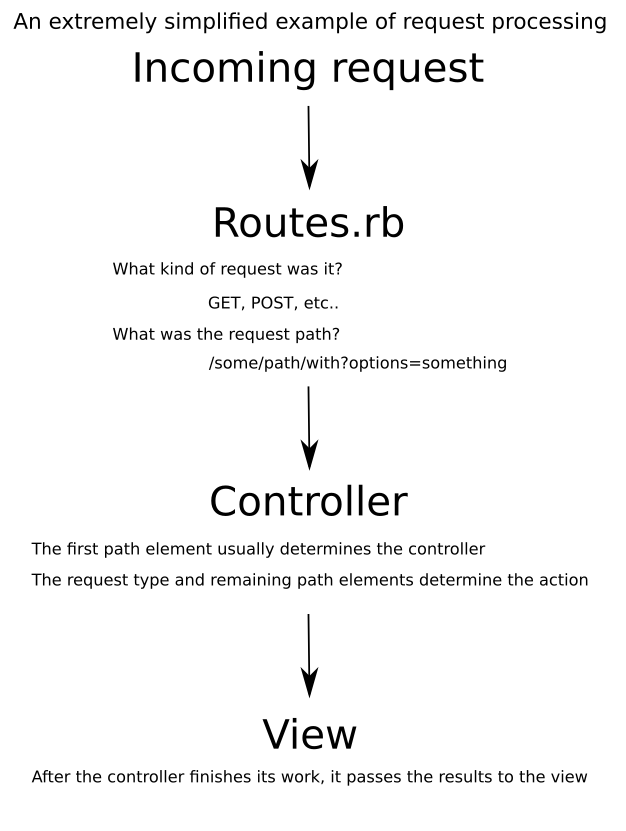
When a request is received by Rails, it needs to figure out what to do with it. The file config/routes.rb exists for this purpose. It takes a network request and determines which controller to pass the request to and which action to call on the controller. The a basic configuration for the routes.rb file can be only a few lines and very easy to understand. However, they tend to grow quite large, and sometimes complex, as the application grows.
In the following example, Rails is instructed what is to be done when the root path “/” is requested. The entry instructs Rails to go to the PagesController and execute the action index.
root 'pages#index'
Controllers are referred to as resources. The following example provides a series of paths that that the controller will accept.
resources page do
  collection do
    get :index
  end
  member do
    get :show
  end
end
Rails interprets these instructions to mean:
- If I receive a GET request with the path /pages, then go to the PagesController and execute the
indexmethod - If I receive a GET request with the path /pages/:id, go to the PagesController and execute the
showaction, passing the parameter id.
Controllers
Controllers have seven default actions. You still need to define them in your controller file, but they will automatically be routed to the controller unless otherwise configured.
- index – HTTP GET request that is used to show a list of elements in a collection
- new – HTTP GET request that is used to create an input mask for creating a new item in a collection
- create – HTTP POST request that is used to actually create a new element in a collection
- show – HTTP GET request, accompanied with an ID, that is used to display an element from a collection
- edit – HTTP GET request, accompanied with an ID, that is used to display an entry so that it can be edited
- update – HTTP PATCH or PUT request, accompanied with an ID, that is used to modify an element in a collection
- destroy – HTTP DELETE request, accompanied with an ID, that is used to delete an element in a collection.
These actions don’t need to be explicitly declared in the routes.rb file and will automatically be passed to the controller. Naturally, you can expand on the list of actions to suite your application’s requirements.
The primary purpose of the controller is to gather data for display or act on requests for modification of the data. While controllers will very often have actions in addition to the seven mentioned above, you should always separate the business logic for the collections into the model.
Models
Models are used to store what is referred to as the “business logic” of the application. Staying with our example of a recipe, the business logic might be something as simple as a method to gather all of Spicy recipes, or to calculate the total number of calories by examining the ingredients and cooking instructions.
Models are typically, but not always, tied to a given table in your data set.
Views
The View is the set of instructions on how to display the information collected by the Controller. If we have a list of recipes, it would probably break the recipes into categories and combine pictures of the finished recipe along with a description and links to the actual recipe instructions. Although views are typically HTML, the can also be PDF, JSON, XML or just about any other data type